All posts by Karol

ping 0xCAFECAFE and shortening IPv4 addresses

Today will be about two little-known features related to IPv4 and ways of writing IPv4 addresses.

Let us start from the end of the title: shortened IPv4 notation. In IPv6 we can omit a sequence of zeros; something similar can also be done in IPv4. For example, by running:

ping 10.2

we query the address 10.0.0.2, and:

ping 10.1.2

queries 10.1.0.2, exactly as in the screenshot below.

IPv4 address shortening and alternative notations.

While writing this, I am wondering whether this really is a feature… especially since I discovered it because of a bug in a script…

And the second “feature”: hexadecimal notation for IPv4 addresses. I wonder what happens if we try to run:

ping 0xCAFECAFE

;-))))

And the third ?feature?… unfortunately I was not able to make this one work: octal notation. In theory, according to the RFCs, IPv4 addresses can also be provided in octal form… but it seems Windows no longer respects that notation.
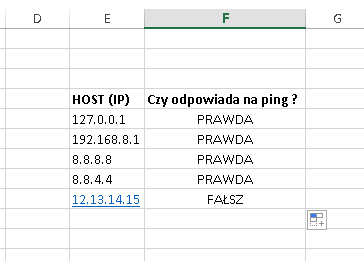
Ping in Excel?

Sometimes in the life of an admin or auditor there is a need to prepare a list of IP addresses used in a network. For some reason, this is often accompanied by a request to deliver the report in Excel.

So what if we taught Excel how to check whether a given IP address is ?alive??

That is how a short VBS module was created, adding two ping functions to Excel. They return TRUE or FALSE depending on whether they receive a response to the ping command.

Screen z Excel

The module contains two functions: PING_HOST and PING_Volatile.

PING_HOST

It takes a server IP address as an argument and returns a Boolean value. Recalculation / execution of the ping command happens when the function argument (the IP address) changes, or when recalculation is forced with Ctrl+Alt+Shift+F9.

PING_Volatile

It takes a server IP address as an argument and returns a Boolean value. Recalculation / execution of the ping command happens when the function argument (the IP address) changes, or when any other cell changes.

Tested in Excel 2016.

File with the module and the example from the screenshot above: : Ping w Excelu

Autologon…

Whenever I wanted to configure autologon for an account with a password, I used registry entries or a script. And here comes a surprise… it can be done from the GUI.

All you need to do:

1. Click Start, type netplwiz, and then press Enter.
2. In the User Accounts dialog box, click the account you want to automatically log on to. If it is available, clear the Users Must Enter A User Name And Password To Use This Computer check box.
3. Click OK.
4. In the Automatically Log On dialog box, enter the user?s password twice and click OK.

The next time you restart the computer, it will automatically log on with the local user account you selected. Configuring automatic logon stores the user?s password in the registry unencrypted, where someone might be able to retrieve it.

…you learn something new your whole life…

More: https://technet.microsoft.com/en-us/library/ee872306.aspx

Windows XP – what to do?

I thought I would never write about Windows XP again… and yet… I came across a network where there are still quite a few of them and, surprisingly, they are holding up (perhaps thanks to a dozen or so people who keep them under control).

For those who have not read it, I recommend:

https://www.microsoft.com/en-us/WindowsForBusiness/end-of-xp-support

It is clear that not everyone can run to the store and buy several dozen licenses immediately, so what can be done to survive somehow?

  • Limit the privileges of people using the systems to the absolute minimum.
  • Enable firewalls on the machines for both incoming and outgoing connections.
  • Move the computers to a separate subnet where traffic will be strictly monitored.
  • Install all available updates for the operating system and components.
  • Uninstall unused operating system components and unnecessary software.
  • Limit Internet connectivity to the absolute minimum.
  • Use an alternative, current browser.
  • Limit browser use and clear browser cache after every close.
  • If possible, disconnect the computer from the network.
  • Provide a high level of antivirus protection for removable devices, or consider disabling them.
  • Verify that the backup mechanisms in use allow system recovery and activation without connecting to Microsoft servers.
  • Deploy and configure additional security mechanisms, such as Enhanced Mitigation Experience Toolkit.
  • Use application whitelisting mechanisms.
  • Wherever possible, use domain policies to introduce restrictions.
  • Provide additional training for users of these systems: what to do when a virus is detected, how to handle media of unknown origin, and so on.