Sometimes in the life of an admin or auditor there is a need to prepare a list of IP addresses used in a network. For some reason, this is often accompanied by a request to deliver the report in Excel.
So what if we taught Excel how to check whether a given IP address is ?alive??
That is how a short VBS module was created, adding two ping functions to Excel. They return TRUE or FALSE depending on whether they receive a response to the ping command.
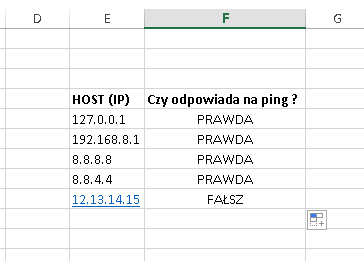
The module contains two functions: PING_HOST and PING_Volatile.
PING_HOST
It takes a server IP address as an argument and returns a Boolean value. Recalculation / execution of the ping command happens when the function argument (the IP address) changes, or when recalculation is forced with Ctrl+Alt+Shift+F9.
PING_Volatile
It takes a server IP address as an argument and returns a Boolean value. Recalculation / execution of the ping command happens when the function argument (the IP address) changes, or when any other cell changes.
Tested in Excel 2016.
File with the module and the example from the screenshot above: : Ping w Excelu